Skip to content

Beacon AI Calling For painting contractors

You’re up a ladder.
Your phone
is covered.

A missed call can be an estimate that goes to the next painter. Beacon answers 24/7, takes the job details, and has the lead in your CRM or your inbox before you’re off the ladder.

Book a 15-minute call

Or hear it for yourself. Call the painter demo line: 1 (833) 917-1711

  • Keep your number
  • No contract, cancel any time
  • Set up for you
Illustrative scene of a painter on a stepladder rolling paint onto a living room wall while his phone lights up on a table

A call comes in at 2:14 pm.

Beacon answers.
You keep painting.

Your CRM

2:17 pm

New lead

Stage
Estimate requested
Job
Main floor, walls and trim
Address
12 Elm Street
Preferred
Thursday morning
An example of a call becoming a lead.

A call while you’re working

From hello
to your next estimate.

Pick a call below and follow it from the first hello to what happens next. These are examples. Your Beacon follows your own answers and your own rules.

A new estimate request

Caller

“Hi, I’m looking for a quote to paint my main floor.”

Beacon

“I can help with that. What’s the address, and is it the walls only, or ceilings and trim too?”

Caller

“12 Elm Street. Walls and trim. Thursday morning works best for me.”

Beacon

“Thanks. So that’s walls and trim on the main floor at 12 Elm Street, with Thursday morning preferred. Is that right?”

What happens next

  1. The lead lands where you work.

    In your CRM, your email or a Google Sheet, with the name, phone, address, the job, the preferred day and a short summary.

  2. Your follow-up runs as usual.

    If your CRM sends new leads a “request received” text or email, these leads get it too.

  3. You get a recap by email.

    A short summary, the caller’s number and a link to the call.

A supplier who needs you now

Caller

“It’s Dave from the paint store. I need to talk to Corey.”

Beacon

“Sure, Dave. I’ll put you through to Corey now. One moment.”

Beacon transfers the call. Corey’s cell rings.

What happens next

  1. Corey picks up and talks to Dave.

    Beacon passes the call to the number you chose for Corey. It can be any regular phone number.

  2. You decide who gets through.

    Suppliers, your crew, a builder you work with. We set up who can be reached, and during which hours, when we set up your Beacon.

  3. After hours, it takes a message.

    Outside the hours you set, Beacon takes Dave’s name and what it’s about, and you get it by email.

A customer checking on their job

Caller

“It’s Karen from Maple Avenue. Is the crew still coming tomorrow?”

Beacon

“I don’t have the crew schedule, so I won’t guess. I can pass your question to the team right now. What’s the best number to reach you?”

Caller

“This one’s fine.”

Beacon

“Got it, Karen. I’ll let the team know you called about tomorrow’s start, with this number.”

What happens next

  1. The message reaches your team.

    By email, and in your CRM as a lead with notes if you’d like it there.

  2. Urgent calls can ring you.

    If you’d like, we set Beacon up to transfer to a number you choose, during the hours you choose.

  3. Everything is saved.

    The recording, transcript and summary stay in your dashboard.

A service Beacon isn’t sure about

Caller

“Do you refinish kitchen cabinets?”

Beacon

“I don’t have that on my list of services, and I don’t want to guess. Can I take your name and number so the team can confirm?”

Caller

“Sure. It’s Priya, and this number is fine.”

Beacon

“Thanks, Priya. I’ll pass along that you asked about cabinet refinishing.”

What happens next

  1. No guessing.

    Beacon answers from the information you approve. When something’s missing, it says so and takes a message.

  2. You hear about it.

    The message arrives by email with the caller’s number.

  3. You decide the answer.

    Tell us what to say next time and we add it to what Beacon knows.

Try it right now

Your turn.
Talk to it.

This is a demo Beacon, set up for a made-up company called Elm & Ivory Painting. Talk to it or type, right here on the page. Ask it what your own customers ask you.

  • Ask for an estimate

    “I’d like a quote to paint my main floor.”

  • Ask something it can’t answer

    “Do you refinish kitchen cabinets?”

  • Ask like a customer

    “Is the crew still coming tomorrow?”

Rather hear it on a real call? Phone the demo line: 1 (833) 917-1711

Elm & Ivory Painting demo

Voice + chat

Easy to start. Easy to stop.

Keep your number.
Switch it off any time.

Nothing is moved or replaced, and there’s no contract. Beacon works through ordinary call forwarding, the same feature you’d use to send your calls to a cell phone.

Your number

Customers call the number they always have.

Your number stays with your phone company, and on your trucks, signs and cards. Nothing changes for the people calling you.

Forwarding on

You forward your calls to Beacon.

Every call, only the ones you can’t answer, or only after hours. The choices depend on your phone company, and we walk you through turning it on.

Forwarding off

Want to stop? Turn forwarding off.

Your phone rings the way it always did. There’s no contract, so you can cancel your plan any time.

The tools you already use

The lead goes
where you work.

You don’t need new software, and you don’t need a CRM. Beacon sends every request to the place you’ll see it.

  • Your CRM

    DripJobs, Jobber, Housecall Pro and most others. The lead arrives like one from your website form, so your follow-up runs as usual. DripJobs is running for a painting contractor today.

  • Your email

    No CRM? Every lead and message reaches your inbox with the caller’s details and a short summary.

  • A Google Sheet or Doc

    Prefer a simple list? Each lead can be added to a sheet or document your team already shares.

We set up the connection for you and test it with you. Every request is also saved in your Beacon dashboard.

Illustrative scene of a painter sitting on the back of her work van at the end of the day, smiling at her phone

What Beacon sends with each lead

  • Name and phone number
  • Email and address
  • The job they want done
  • Preferred day and time of day
  • A one-sentence summary
  • The source: Beacon AI Calling

Your dashboard

Every call,
in one place.

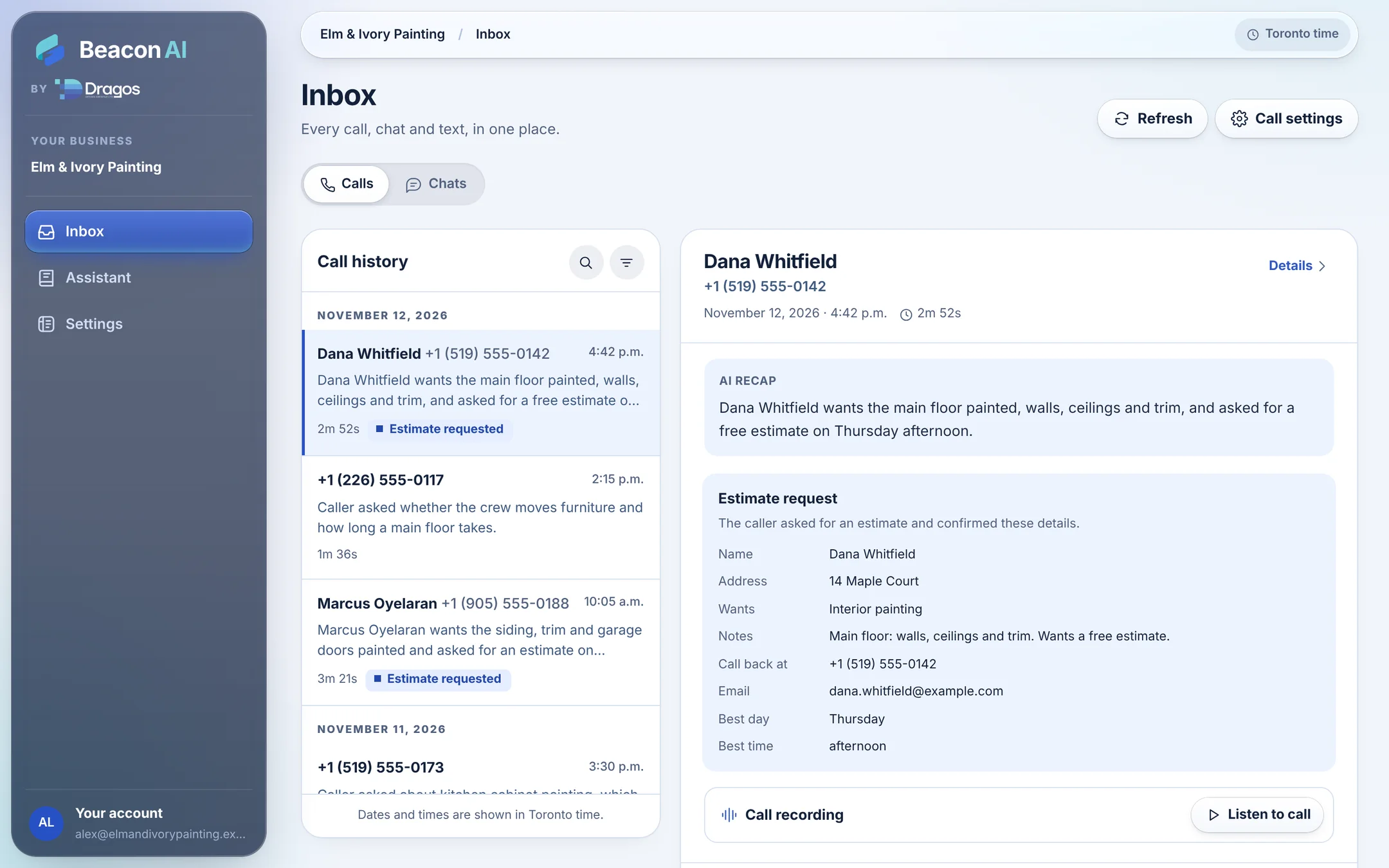
You get your own Beacon dashboard. Open it on your phone or your computer, wherever you are, and see exactly what was said. It’s built for owners who’d rather be painting than learning software.

The Beacon dashboard on a computer. A list of calls is on the left. One call is open on the right with its summary, the estimate details and the recording.
The same call open in the Beacon dashboard on a phone.
The Beacon dashboard, with example calls for a made-up painting company.
  • Listen to every call

    Each call has its recording, a transcript and a short summary.

  • Read your website chats

    See what visitors asked your website chatbot, and what it told them.

  • See and send texts

    Once texting is approved for your Beacon line, see the texts Beacon sent and text a customer from the same number.

  • Simple switches

    Change where your emails go or what Beacon is allowed to do. Or ask us, and we’ll do it for you.

Your numbers

One missed call.
One missed estimate.

Put in your own numbers to see what unanswered calls could add up to in a month. The ones shown are only an example.

Illustrative scene of a phone ringing on a drop cloth beside a paint roller and tray

Work that may be going elsewhere each month

$8,400

Beacon AI Calling starts at $159 USD or $199 CAD a month.

Missed calls × 4 weeks × your close rate × your average job. Simple arithmetic on your own numbers, not a promise of results.

Then check it against real leads.

Every lead Beacon sends to your CRM is marked with where it came from. In DripJobs, for example, the lead source shows “Beacon AI Calling”. Add up the jobs with that source and you’ll see what Beacon brought in, right beside what it costs.

Done for you

We set it up.
You keep painting.

You don’t build anything. We read your website, ask a few useful questions, and set Beacon up around the way your business takes calls.

Illustrative scene of a painter with a tablet walking a homeowner through a room before an estimate

What Beacon knows

You approve every fact.

Your services, service area, hours and anything you’re happy to say about pricing. We draft it from your website and a short questionnaire. Nothing goes in until you’ve approved it.

What Beacon does

You choose the next steps.

Take estimate requests, pass on messages, transfer the calls that need you. You decide what happens and who hears about it.

Your tools

We connect your tools.

We set up the hand-off to your CRM, your email or a Google Sheet, and test it with you before launch.

Try it, then go live

Hear it before your customers do.

You get a demo phone number to call and test. When you’re happy, forward your number to Beacon: every call, only busy and unanswered ones, or after hours.

Included with every plan

Your website gets
a chatbot too. Free.

Every calling plan comes with a Beacon chatbot for your website, at no extra cost. It knows the same answers as your phone line, so someone looking at your site at 10 pm gets the same help as someone who calls.

  • Answers questions about your services, area and hours
  • Takes estimate requests and emails them to you
  • Every chat is saved in the same dashboard as your calls

Want to try one? The chat button in the corner of this page is the chatbot for our demo painting company.

Chat with us

Do you paint exteriors too?

We do. Siding, trim, doors and garage doors. Would you like a free estimate?

Yes please.

Great. What’s the address, and what would you like painted?

An example chat on a painter’s website.

A plan for your calls

Useful minutes.
Real support.

Every plan includes a chatbot for your website and ongoing tuning by DDC. Choose the minutes that fit your business. No contract. Cancel any time.

Canadian pricing · CAD

100 AI minutes / month

$199 CAD / month

$0.75 CAD per extra minute

Get started

Website chatbot included

200 AI minutes / month

$279 CAD / month

$0.75 CAD per extra minute

Get started

Website chatbot included

300 AI minutes / month

$349 CAD / month

$0.60 CAD per extra minute

Get started

Website chatbot included

One-time setup: $1,000 CAD on every plan. Your business brief, approved knowledge, routing, connections, and testing.

All prices in CAD. Taxes extra.

US pricing · USD

100 AI minutes / month

$159 USD / month

$0.60 USD per extra minute

Get started

Website chatbot included

200 AI minutes / month

$219 USD / month

$0.60 USD per extra minute

Get started

Website chatbot included

300 AI minutes / month

$279 USD / month

$0.45 USD per extra minute

Get started

Website chatbot included

One-time setup: $749 USD on every plan. Your business brief, approved knowledge, routing, connections, and testing.

All prices in USD. Taxes extra.

Only time the AI handles a call counts. Time after a transfer to your team doesn’t use your included minutes. Your own software subscriptions, such as your CRM, aren’t included.

Beacon AI Calling

Let’s set up
your Beacon.

Tell us a little about your business. Graham will be in touch to confirm your plan, answer your questions and start your setup. Nothing to pay today.

Your plan

We’ll use these details to contact you about Beacon. Read our privacy policy.

A 15-minute call

Pick a time.
We’ll call you.

Graham Kivell

Graham Kivell
Co-owner. The person you’ll talk to.

Choose a time below and Graham will call you then. You’ll talk through how your calls come in and whether Beacon is a good fit. Nothing to prepare, and nothing to pay.

Loading open times…

Want to hear Beacon first? Call the painter demo line: 1 (833) 917-1711

Good questions

A little more
before we talk.

Will it sound robotic?

Beacon speaks naturally and callers can interrupt it, the way they would with a person. Its greeting tells callers they’re speaking with an AI assistant. Call the demo line at 1 (833) 917-1711 and judge for yourself.

Do I have to change my phone number?

No. You keep your number and forward calls to Beacon. That can be every call, only the ones you can’t get to, or only after hours. Nothing is moved away from your phone company.

How will I know it’s worth the money?

You’ll be able to see it. Every lead Beacon sends to your CRM is marked with its source. In DripJobs, for example, the lead source shows “Beacon AI Calling”. That tells you which estimates and jobs came through Beacon, so you can put what they were worth beside what your plan costs. Every call is also listed in your dashboard, so you can count them any time.

What if I want to stop?

There’s no contract. Turn off call forwarding and your phone rings the way it always did. You can cancel your plan any time in the Client Portal, or ask us to do it for you. Your plan runs to the end of the month you’ve paid for. Payments already made aren’t refunded, and neither is the setup fee once your Beacon is set up. Your number never leaves your phone company, so there’s nothing to move back.

Does it work with my CRM?

Most likely. If your software can connect to other tools, we can connect Beacon to it. That includes DripJobs, Jobber and Housecall Pro. When a caller confirms a request, it shows up in your CRM as a new lead. We check your software with you on a call, then set up and test the connection for you.

What if I don’t use a CRM?

You don’t need one. Beacon can email every lead to you, or add each one to a Google Sheet or Doc. Every request is also saved in your Beacon dashboard, so nothing gets lost.

What happens when it doesn’t know an answer?

It doesn’t guess. Beacon works from the information you approve. When an answer is missing, it says so and offers to take a message, or transfers the call if you’ve set that up.

Can it book estimates into my calendar?

Yes, if you’d like that. Beacon can offer open times from a Google Calendar you share with it and book the visit. Or it can simply take the caller’s preferred day and time and pass that along with the lead for you to confirm.

Are calls recorded?

Recording is on by default, with a notice at the start of the call, and you can switch it off. Recordings, transcripts and summaries are kept in your dashboard.

Who sets it all up?

We do, start to finish. You approve what Beacon says and test it before your customers ever hear it.


The people you’ll be talking to

Real people.
Very much in your corner.

We’re Graham Kivell and Matt Dragos, co-owners of Dragos Design Creative. Our studio has been building websites for small businesses for over a decade. Beacon is how we help with the phone, too.

Graham is usually the first person you’ll talk to. From there we set up your Beacon, test it with you, and keep tuning it after it goes live. When you want something changed, you call or email us, and we do it.

Book 15 minutes with Graham
Graham Kivell

Graham Kivell

Co-owner

Matt Dragos

Matt Dragos

Co-owner

Hear it for yourself

Call the demo line.
Beacon will answer.

We set up a demo line as an example painting company. Call it and ask what your own customers ask you. Then book 15 minutes with Graham to talk about your calls.